The MambaBuy order route, told with MambaBuy's own screenshots
Step by step, this is the order route MambaBuy publishes in its Tutorial article, rewritten in plain English and checked against the current site on 23 October 2026. Every screenshot below comes from MambaBuy's help centre; email addresses and addresses are blurred.
MambaBuy's own walkthrough video
MambaBuy keeps one tutorial video in the How To Buy player on its home page. It runs one minute forty, with English captions, and follows an order from the home page through cart and confirmation to the parcel payment. It was recorded on the 2025 version of the site, whose headline then read China Shopping Simplified, so a few buttons have since moved. The route is the same.
Nothing downloads from MambaBuy's file host until you press play.
The ten stops on this page
Before the first click: the four marketplaces
MambaBuy buys from Taobao, 1688 and Weidian, and its tutorial opens with a short guide to the Chinese platforms. Tmall is the brand-certified mall inside Taobao, with strict seller rules and higher prices. Taobao is the open marketplace of individuals and small businesses, where the tutorial says to check the store deposit, ratings and reviews. Weidian sellers trade through WeChat and are strong on niche hobbies such as anime goods and collectibles. 1688 is Alibaba's wholesale site, built for buying in bulk at factory prices.
Links from JD, Pinduoduo and Xianyu do not go through the normal search box; they use the DIY Order form described on the forwarding and DIY page.

Register and verify the email
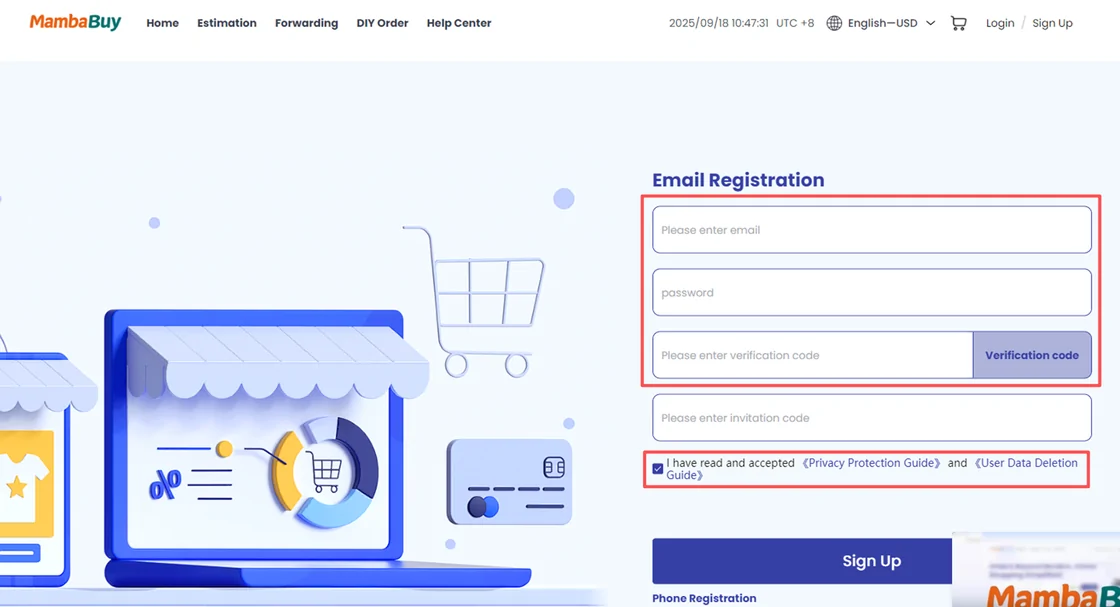
Click Sign up at the top of mambabuy.com, then fill in an email address you actually read, a username, a password and the verification code. MambaBuy's registration article puts it at one minute.
Then open the confirmation email. Verification matters for money: the new-user gift of twenty international-shipping coupons, with a face value of CN¥2,990 and valid for 180 days, is credited only after the address is verified.
Hand MambaBuy the marketplace link
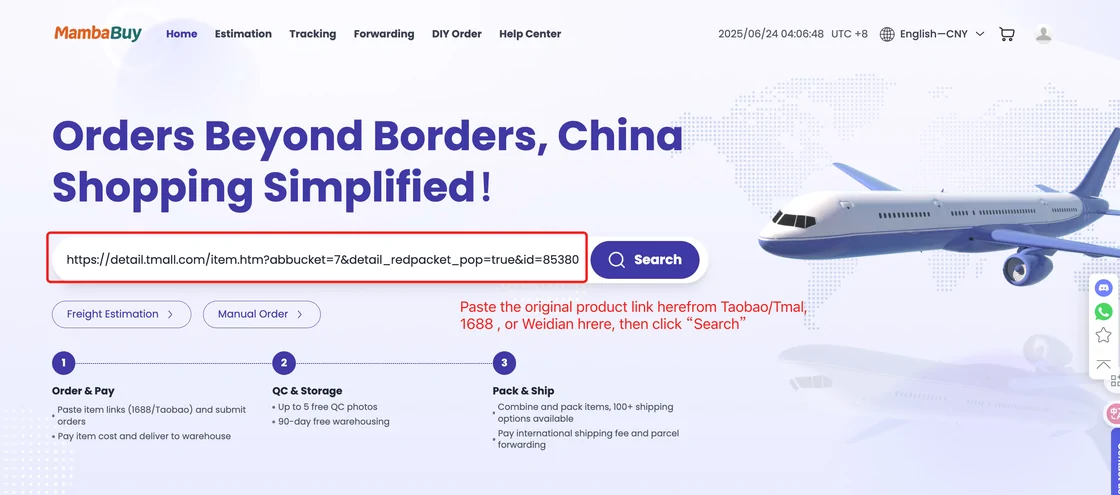
Copy the product link from the marketplace and paste it into the MambaBuy search bar, then press Search. The tutorial screenshot shows a full Tmall link pasted into the bar on the home page. You can also type keywords and search the marketplaces from inside MambaBuy, or press the camera icon in the search bar and upload a picture to search by image.
If you found the item on a spreadsheet shelf, open the listing there first and copy the marketplace link from it, so that MambaBuy gets the exact listing and not a near match.
Pick the option and submit
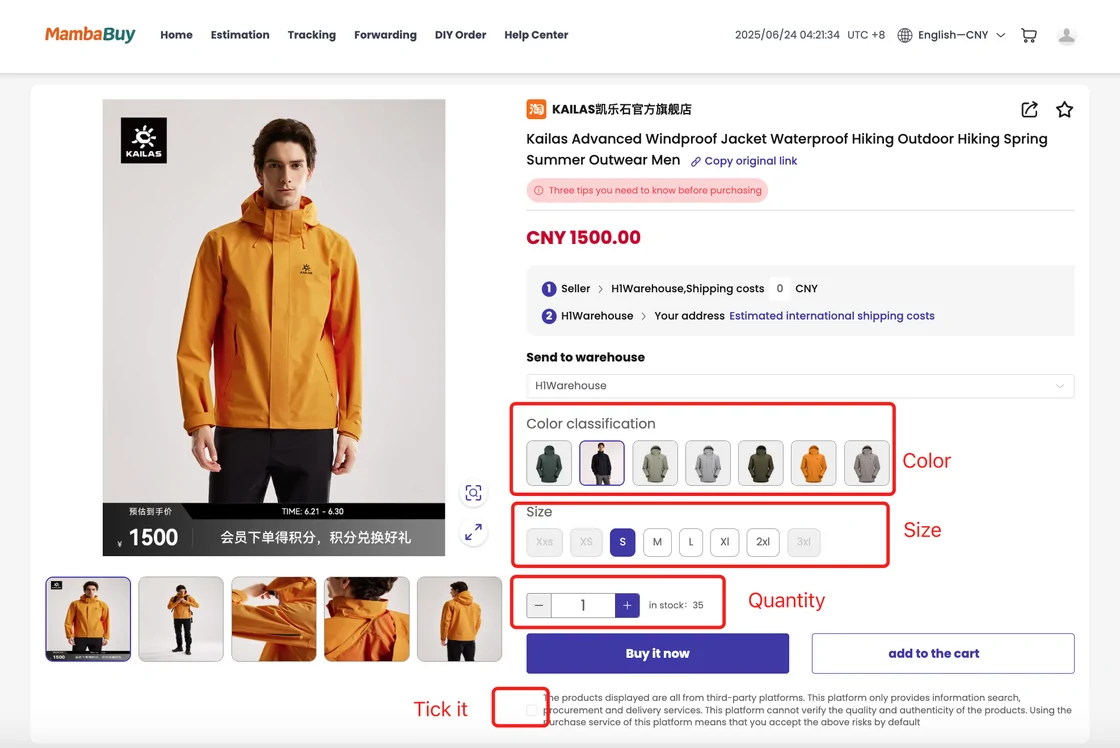
MambaBuy shows the listing with the seller's own colour and size options. Choose the option, set the quantity, and either add it to the cart or buy it straight away. Under the price you will see the seller's domestic shipping cost and an estimated international shipping figure, which is only an estimate until the parcel is packed.
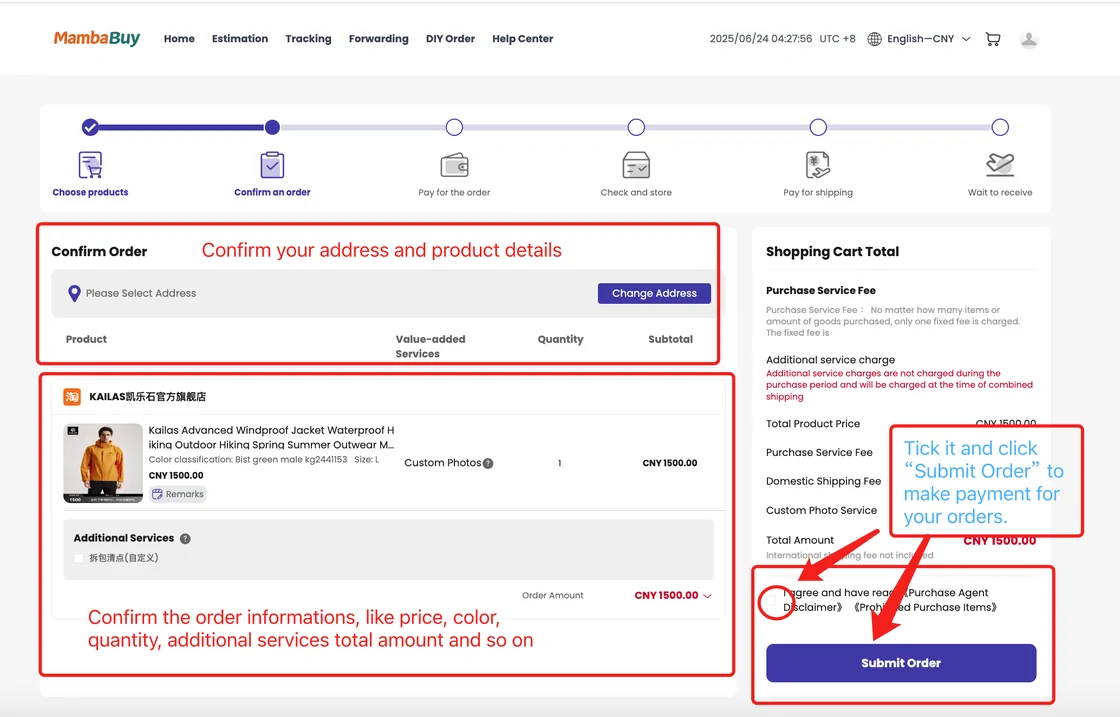
The confirmation page lists the item, any custom photo request, and value-added services. Before Submit Order becomes active you tick a box accepting the Purchase Agent Disclaimer and the Prohibited Purchase Items notice. Read both once; they explain what MambaBuy will not check and what it will not ship.
Settle the goods total
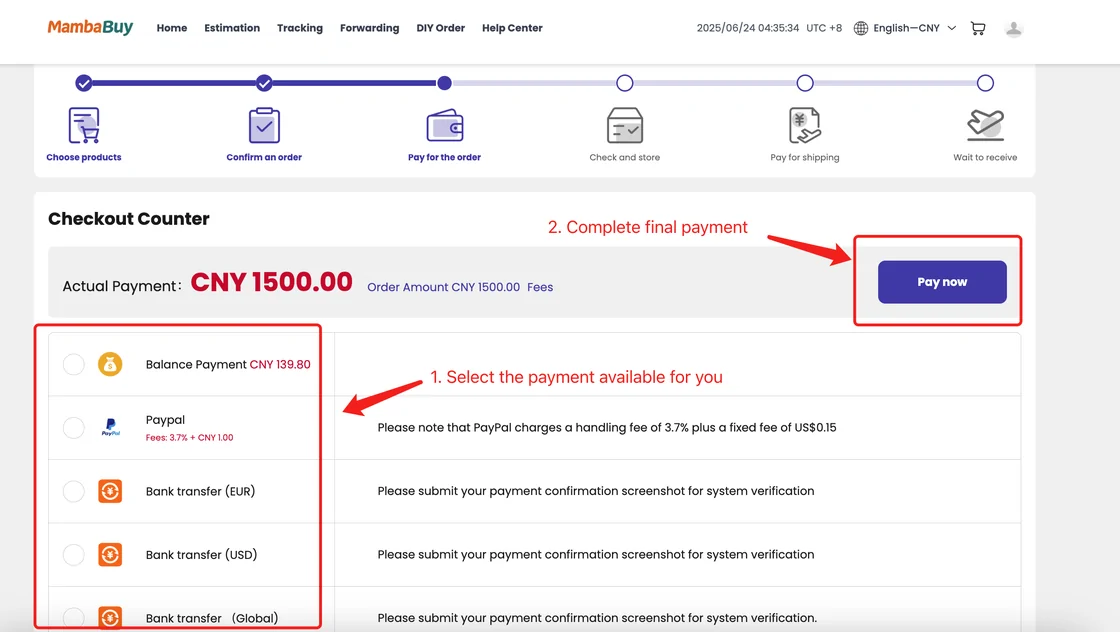
The checkout counter shows the amount due in yuan and the payment methods on offer. In the tutorial screenshot those are account balance, PayPal (with the PayPal fee printed beside it) and three bank transfer options for EUR, USD and global accounts, each asking you to upload a payment confirmation screenshot.
Which methods you see depends on the day. MambaBuy's own articles disagree: one says PayPal and Alipay only, the top-up page lists bank transfer, card and PayPal with their fees, and a September 2026 notice lists Alipay, PayPal and balance. Our costs page sets the three versions side by side.
A MambaBuy buyer orders from the seller
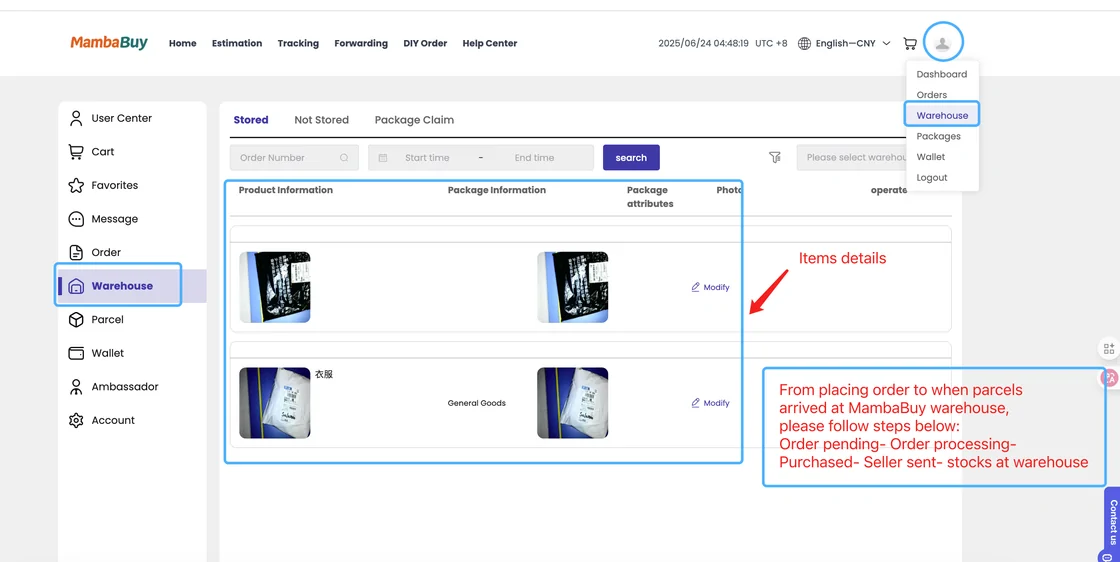
Once paid, a MambaBuy buyer orders the item from the seller. The tutorial promises this within two business hours, and the holiday notices say purchasing continues during Chinese public holidays even when sellers pause shipping.
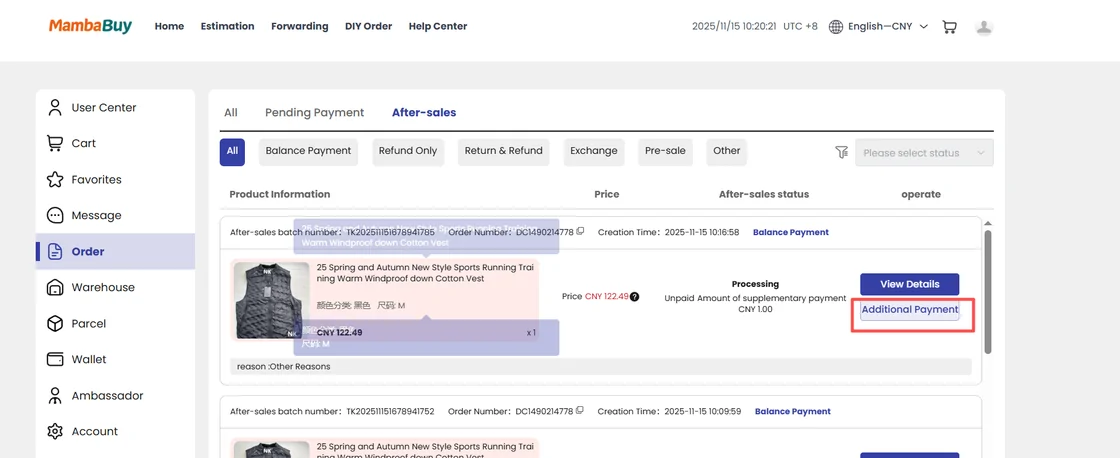
Sometimes the buyer comes back with bad news: the item is sold out although the listing still shows stock. MambaBuy's help explains that many sellers do not update their inventory and that it checks with the seller before telling you. If the seller raises the price, the order moves to After-sales and asks for a balance payment, which you settle with the Repayment button.
Arrival, weighing and photos
When the parcel from the seller reaches the warehouse, staff check it, record weight and volume, take high-definition photos and mark it Stored. The tutorial says problems found at this stage are reported within 24 hours with suggested solutions.
Stored is the moment two clocks start. You have five days to ask for a return or exchange (MambaBuy measures it as 120 hours), and ninety days of free storage before fees. Look at the photos the same day; our photo page lists what each item type should show.
Choose what travels together
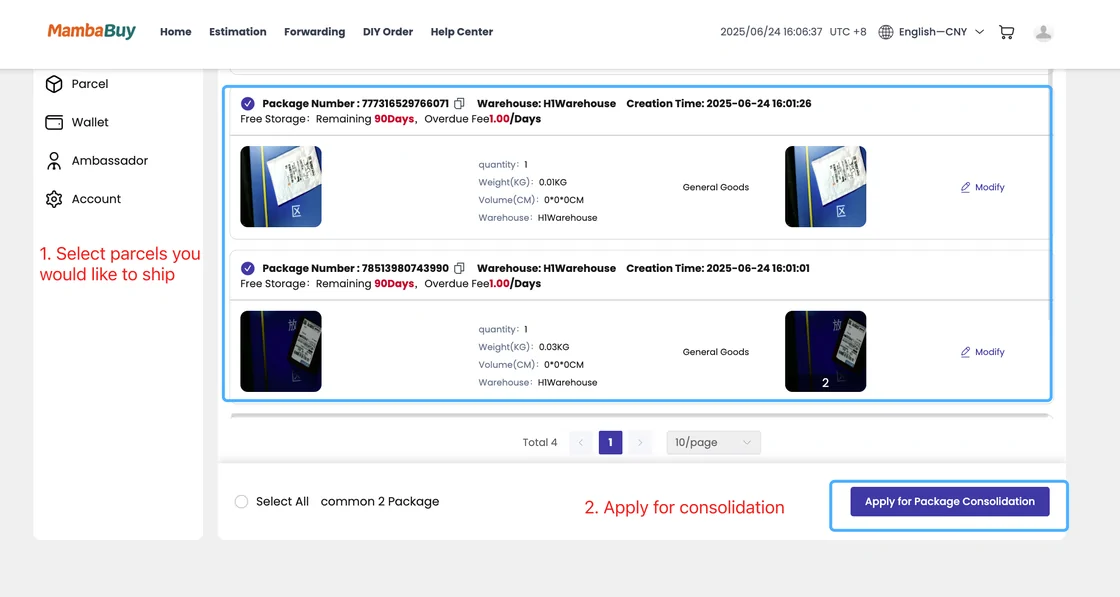
Under Warehouse, select every stored item meant for the same box, then press Apply for Package Consolidation. Each entry shows free storage remaining and the weight and volume the warehouse recorded, so you can see the parcel growing before it exists.
MambaBuy's warning here is about restricted goods: if a parcel contains items with shipping limits, the system filters the line list automatically and fewer lines will be offered. Splitting the restricted item into its own parcel can bring the cheaper lines back for the rest.
Address, line and freight
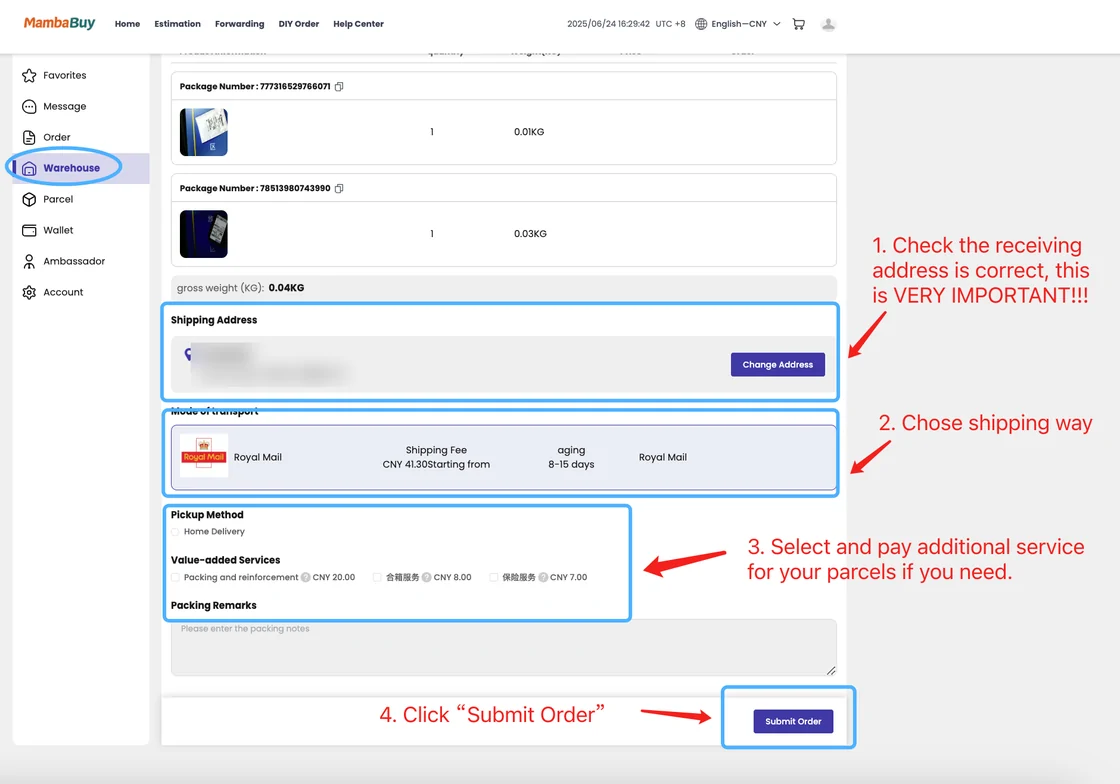
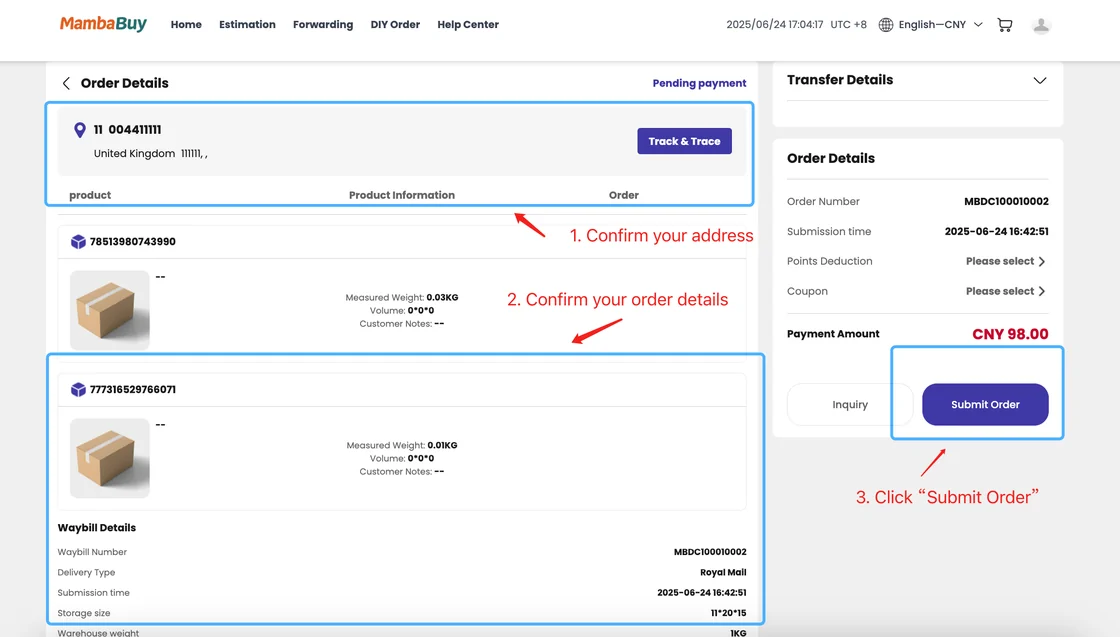
The parcel form asks for four things: check the delivery address (the tutorial marks this as very important), choose a shipping line, pick value-added services, and submit. The line list shows each carrier's price and transit time for your parcel. Enter a coupon code at checkout and it comes off the freight.
Freight is charged on the weight after packing, and the larger of actual and volumetric weight counts. If you want the real weight before choosing, MambaBuy's Package Preview service packs and weighs first for CN¥18 per shipment.
Packing and dispatch
MambaBuy's tutorial lists four warehouse moves at dispatch: consolidate, weigh, reinforce and photograph. Paid parcels go out the same day if the freight is paid before 17:00 China Standard Time; parcels paid later leave the next working day, and nothing ships on Sundays.
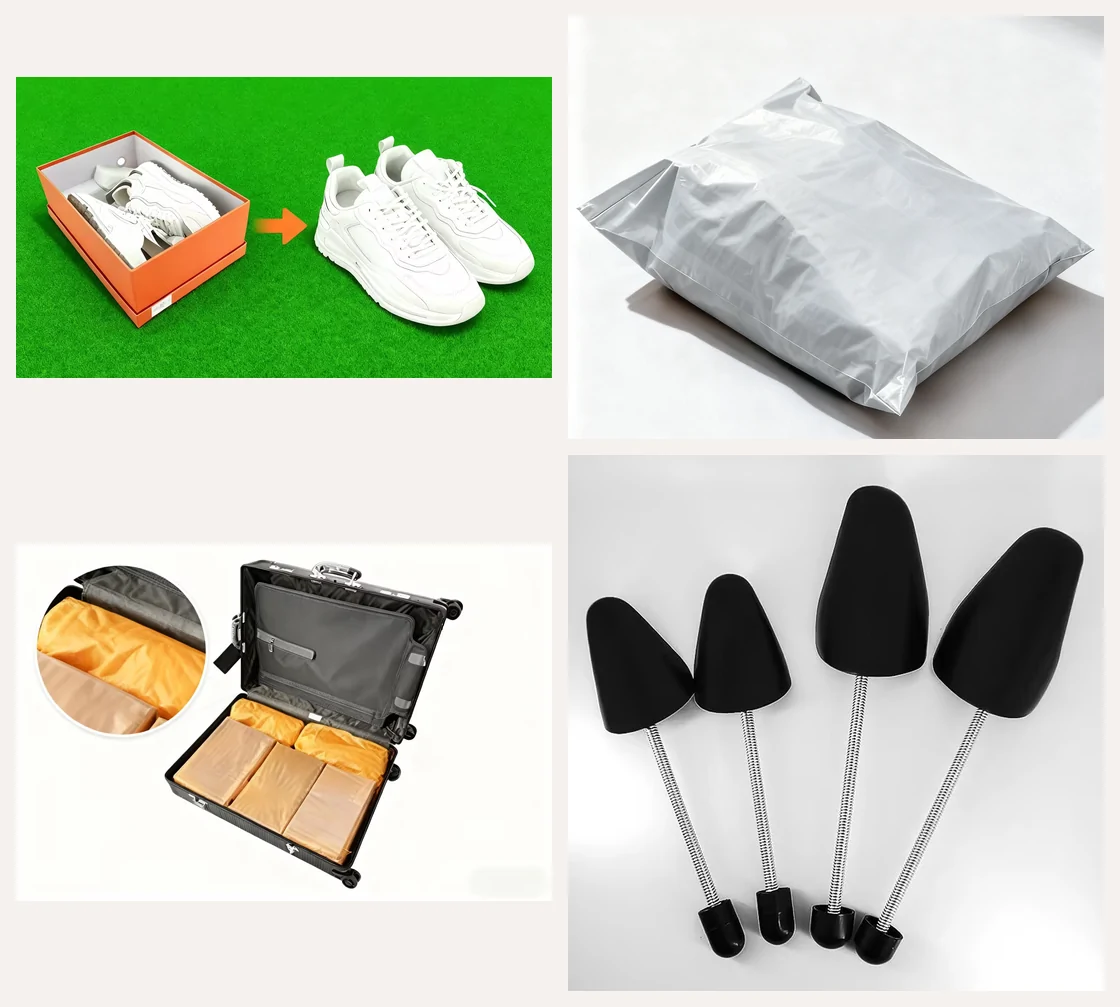
Packing extras are chosen on the parcel form. Removing shoe boxes and using spare space inside a suitcase are free. Carton corner protectors cost CN¥15, shoe trees CN¥8 each, a collapsible shoe box CN¥3, and a full packing video CN¥35.
Following the parcel home
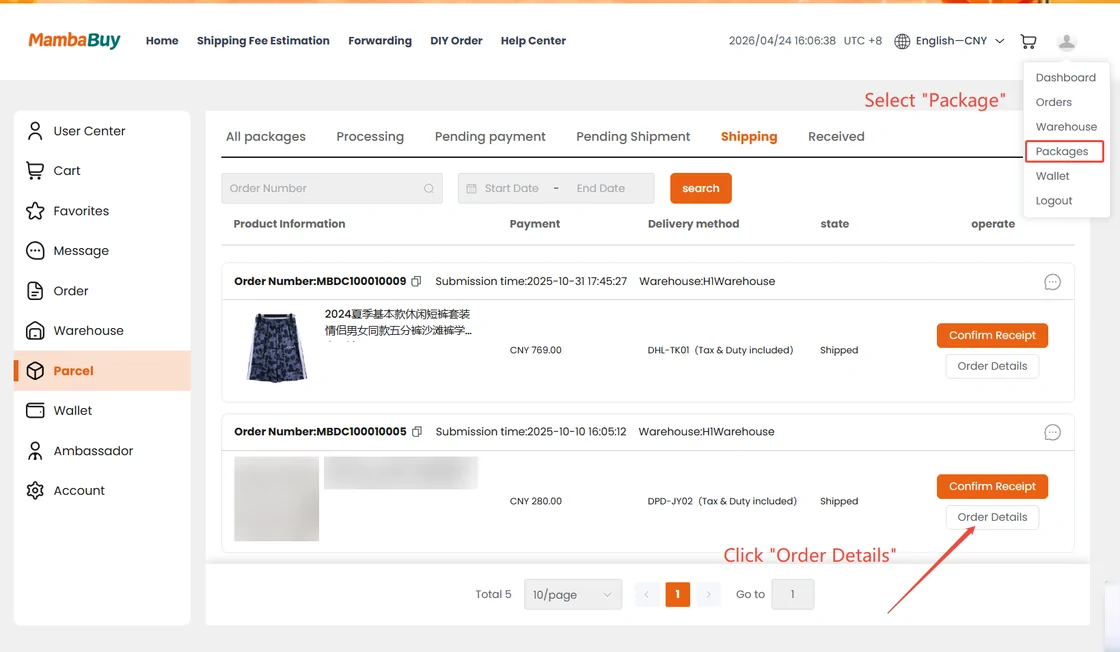
Once dispatched, the parcel appears under Parcel in the member centre. On a computer, open the account menu, choose Packages and press Order Details; on a phone, tap Mine, then Parcel, then the parcel itself. MambaBuy's tracking article warns that international tracking updates lag behind the parcel because several carriers hand it on, and says staff will provide another tracking address if the system shows nothing.
When it arrives, check the contents before you throw away the packaging. Claims for missing items under Shipping Protection need an unedited, continuous unpacking video that starts with the sealed parcel.