Self-bought parcels, DIY forms and staff-typed orders
Three side doors into MambaBuy's warehouse, for goods that do not come through the normal search box.
Purchasing service or parcel forwarding
MambaBuy runs two services. With the purchasing service it buys the item for you: you pay goods plus the seller's domestic delivery, the buyer orders, and the item is inspected and stored. MambaBuy's help says this works for customers without a Taobao or Alipay account. With parcel forwarding you buy the goods yourself, or a friend posts them, and the warehouse only receives, checks and stores them.
The cost formulas differ by one line. Purchasing: goods + international shipping + packing + cargo insurance + optional services. Forwarding: international shipping + packing + cargo insurance + optional services. Once both kinds of item are in the warehouse, they can travel in the same parcel as long as the weight limit allows.
| Purchasing service | Parcel forwarding | |
|---|---|---|
| Who pays the seller | MambaBuy, from your balance | You, on your own marketplace account |
| What you submit | A product link or search result | Item name, quantity, price, remarks and the courier tracking number |
| Suited to | Shoppers without a Chinese account | People with their own Taobao or Alipay account, gifts, personal belongings |
| Inspection | Standard photos included | Optional QC and counting, chosen when you pre-register |
Pre-registering a parcel you sent to the warehouse
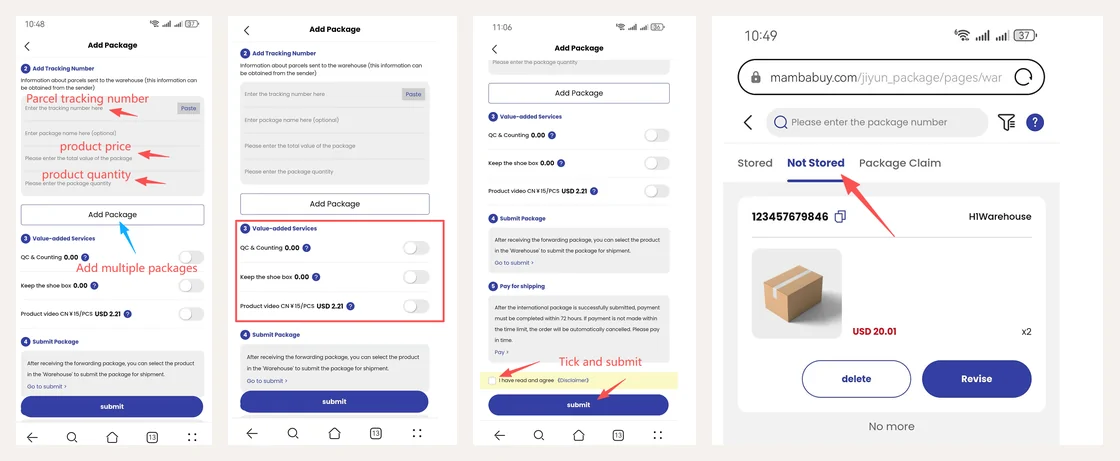
Goods you send yourself must be announced before they arrive, or staff cannot match them. Open Forwarding from the home page, enter the courier tracking number with the item price and quantity, and add a separate entry for each courier parcel. Then choose services: QC and counting, keeping the shoe box, or a product video at CN¥15 per item. Tick the disclaimer and submit.
The parcel then waits under Warehouse, Not Stored, until it is booked in. MambaBuy's forwarding rules say badly damaged parcels can be refused and returned to the sender, that every intact parcel is screened for prohibited items and weighed, and that you should contact the courier or support if nothing has arrived after three to five business days.
DIY orders for JD, Pinduoduo and Xianyu
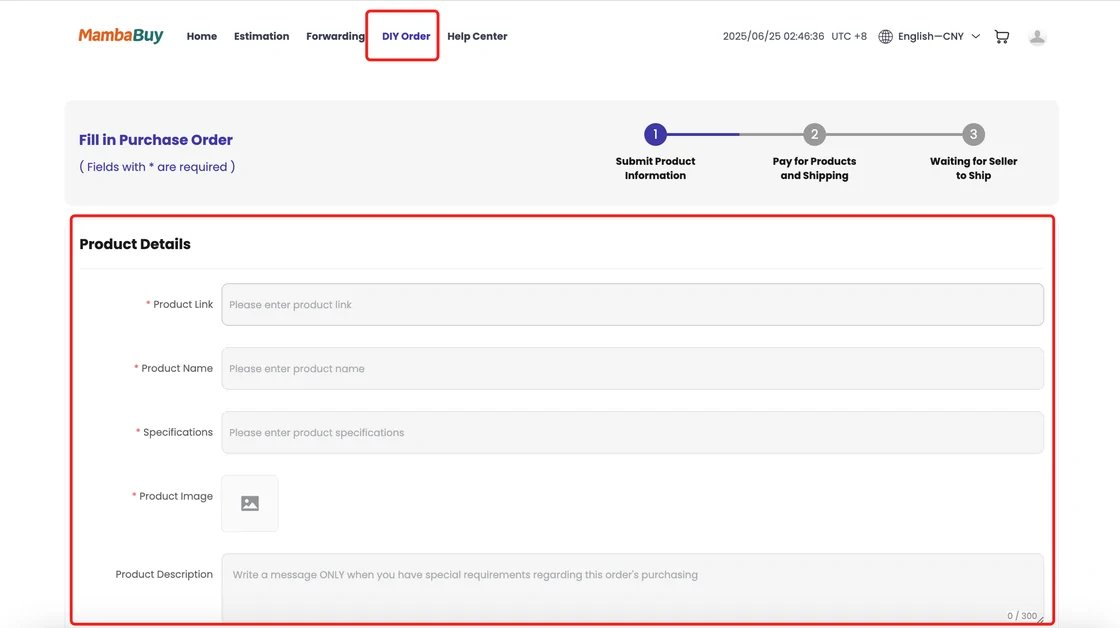
Links from platforms the search box does not read go through DIY Order on the home page. Paste the link, fill in the price, quantity, specifications and an image of what you want, then pay. The tutorial says MambaBuy then buys within 24 hours, and from there the order follows the normal route from the arrival stage onward.
Price is the field to get right. If you enter less than the seller charges, the order comes back with a balance payment request before anything is bought.
Orders typed in by MambaBuy staff
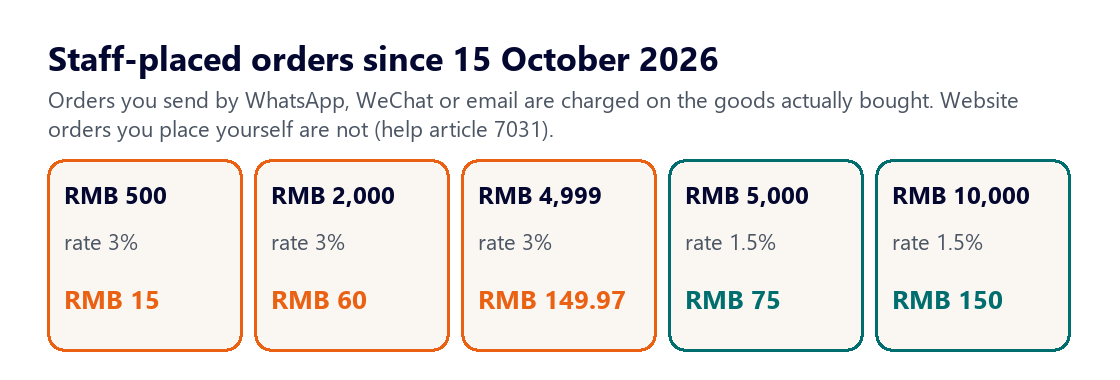
If you send links by WhatsApp, WeChat or email and ask staff to place the order, a manual order fee applies. From 15 October 2026 it is 3% of the goods actually bought when the order is below RMB 5,000, and 1.5% of the whole order at RMB 5,000 or more. It replaced the old charge of RMB 35 per ten links. The fee base excludes domestic and international freight, taxes, insurance, payment fees and storage.
Two details from the fee standard are worth knowing. Items the seller could not supply drop out of the fee base. And once staff have placed the order, the fee is not refunded if you change your mind or picked the wrong size. Placing the same order yourself on the website costs nothing extra, which is the route MambaBuy itself suggests.
MambaBuy on a phone home screen
MambaBuy's help centre has a short article on pinning the mobile site to a phone home screen. Open the site in the phone browser, choose country, language and currency, tap the share icon, choose Add to Home Screen and name the shortcut. The mobile site uses an indigo theme rather than the desktop orange, which is why some screenshots on this site look different.
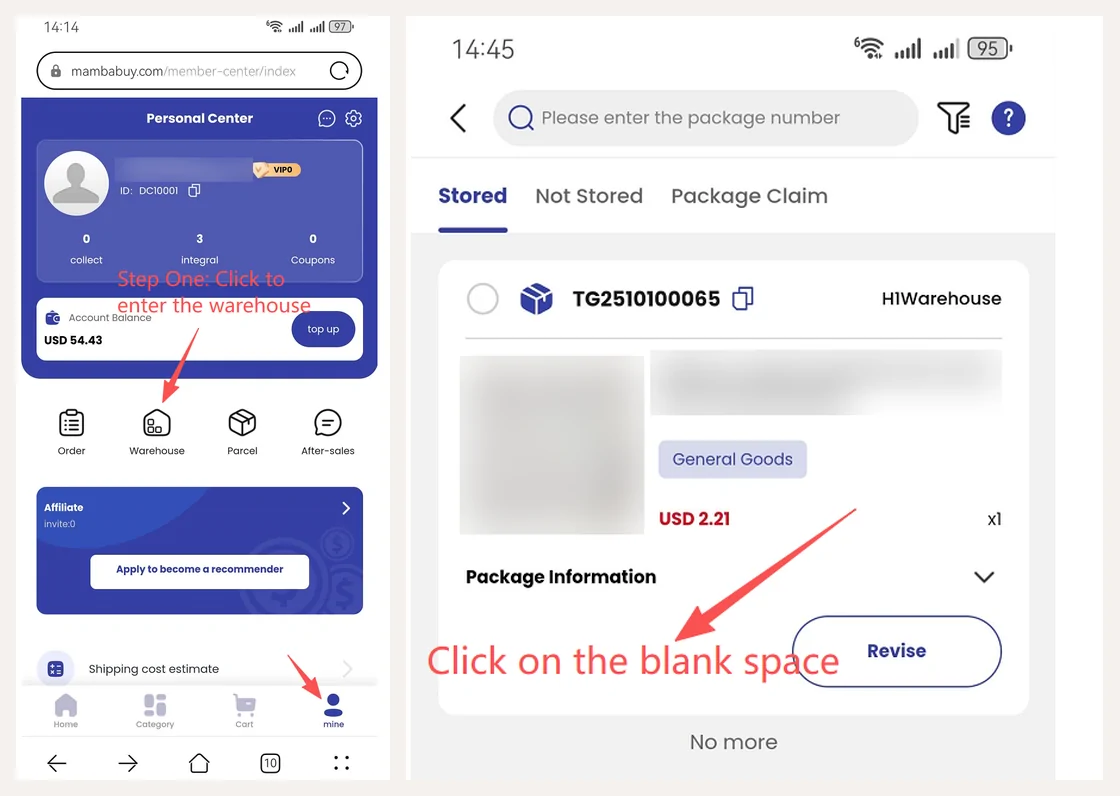
The phone layout puts Order, Warehouse, Parcel and After-sales on the personal centre page, and the shipping cost estimate at the bottom of the same page.